
What are motion axes?
What is an axis of rotation (rotational motion axis)?
Before figuring out how your knees move, you'll first need to understand the concept of motion axes. Motion axes can be used to describe any two objects moving relative to one another. Imagine for example, two objects commonly seen moving relative to one another: a cat and a mouse.
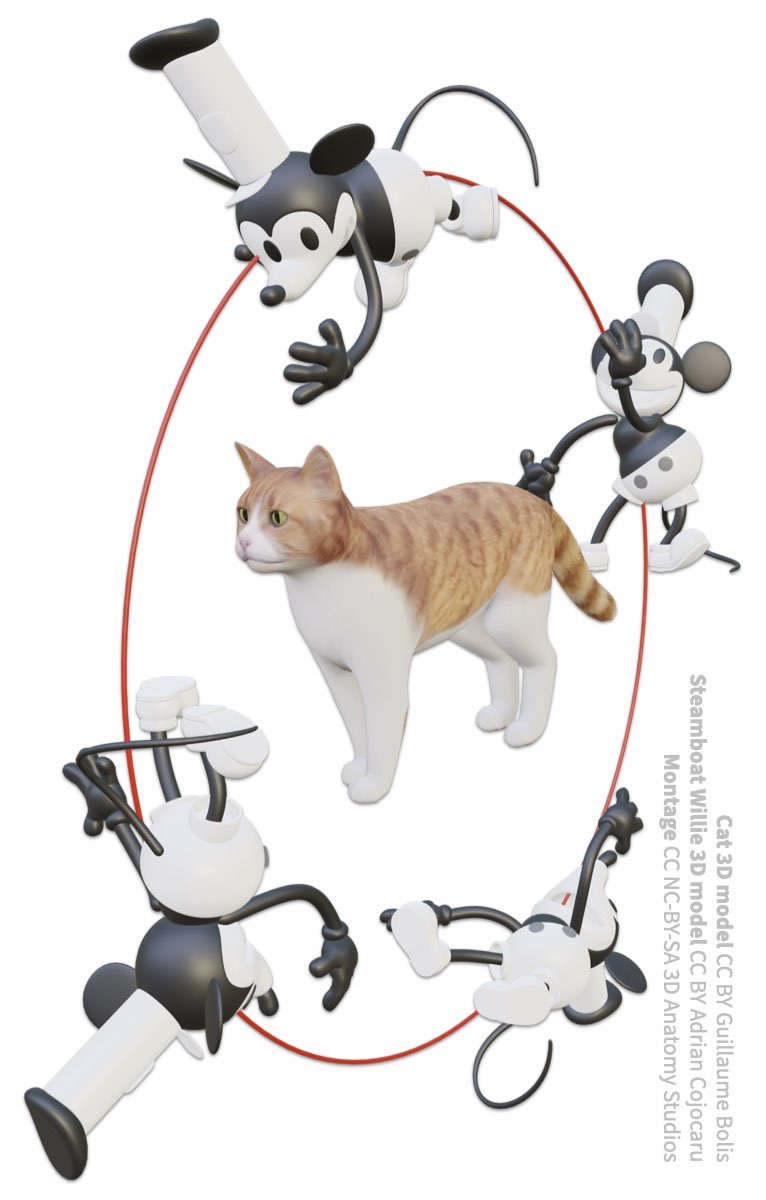
A mouse moving around a cat along a circular path (indicated in red).
If the mouse is moving a circle around the cat, you could say that the mouse is rotating around the cat (you could also describe the mouse as orbiting around the cat like a planet around a sun, but with a circular orbit). Below is the same motion in video form.
Video of mouse rotating 360 degrees around a cat. The circular path taken by the mouse is shown as a red circle.
Now, take your hand, hold it up to the image or video of the rotating mouse and curl your fingers to follow the mouse's path of motion (for this activity, it doesn't matter which hand you use or which direction you curl your fingers, as long as they follow the path).
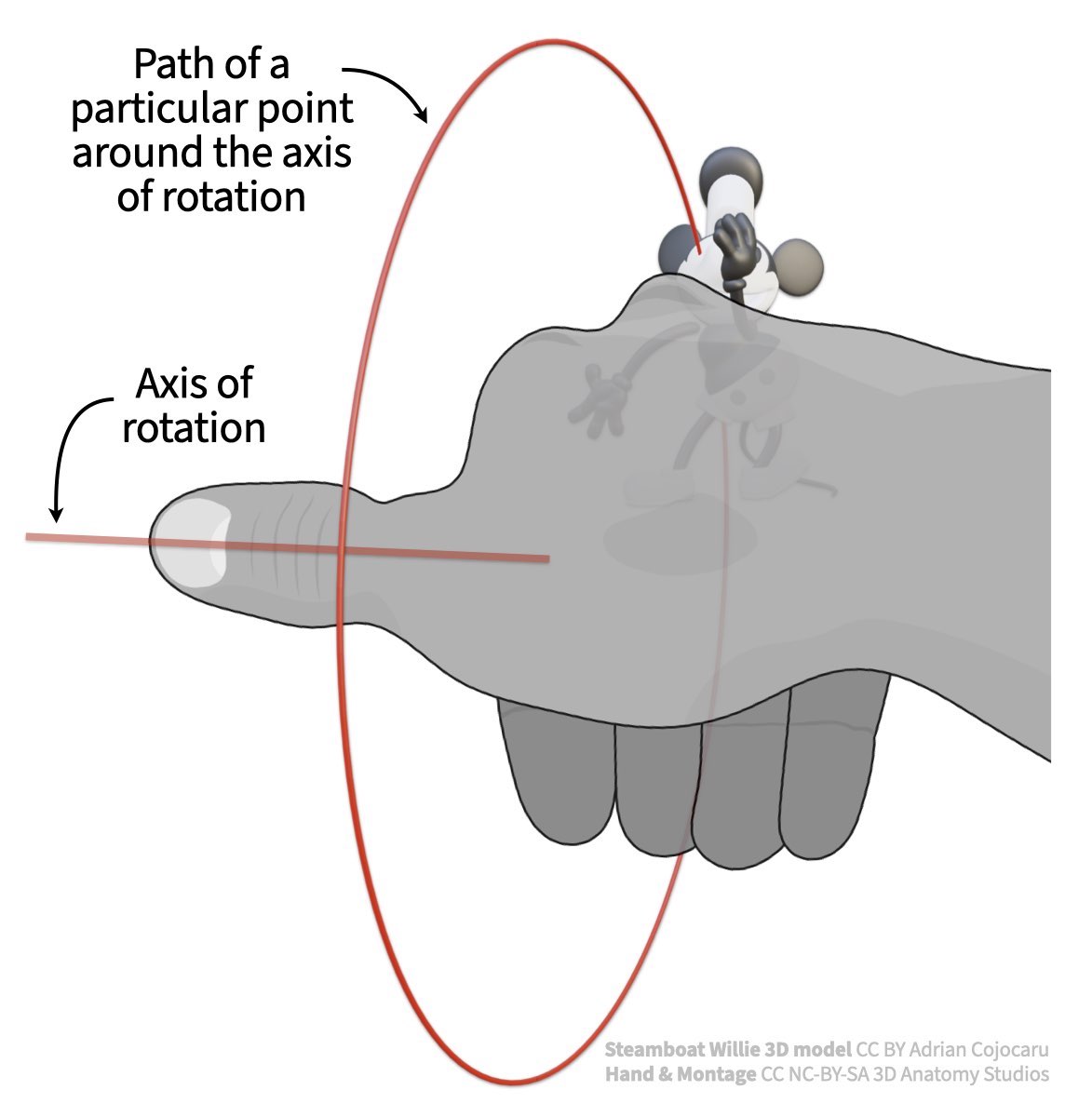
Curl the fingers of your hand to follow the mouse's path and your thumb will indicate the location and orientation of the mouse's axis of rotation.
With your fingers following the mouse's path, your thumb is now showing you the mouse's axis of rotation relative to the cat. For a circular path, the axis of rotation is a 3D vector that is oriented 90 degrees relative to the circular path (perpendicular or orthogonal) and passes through its center. This is the "central axis" around which the mouse is spinning/rotating.
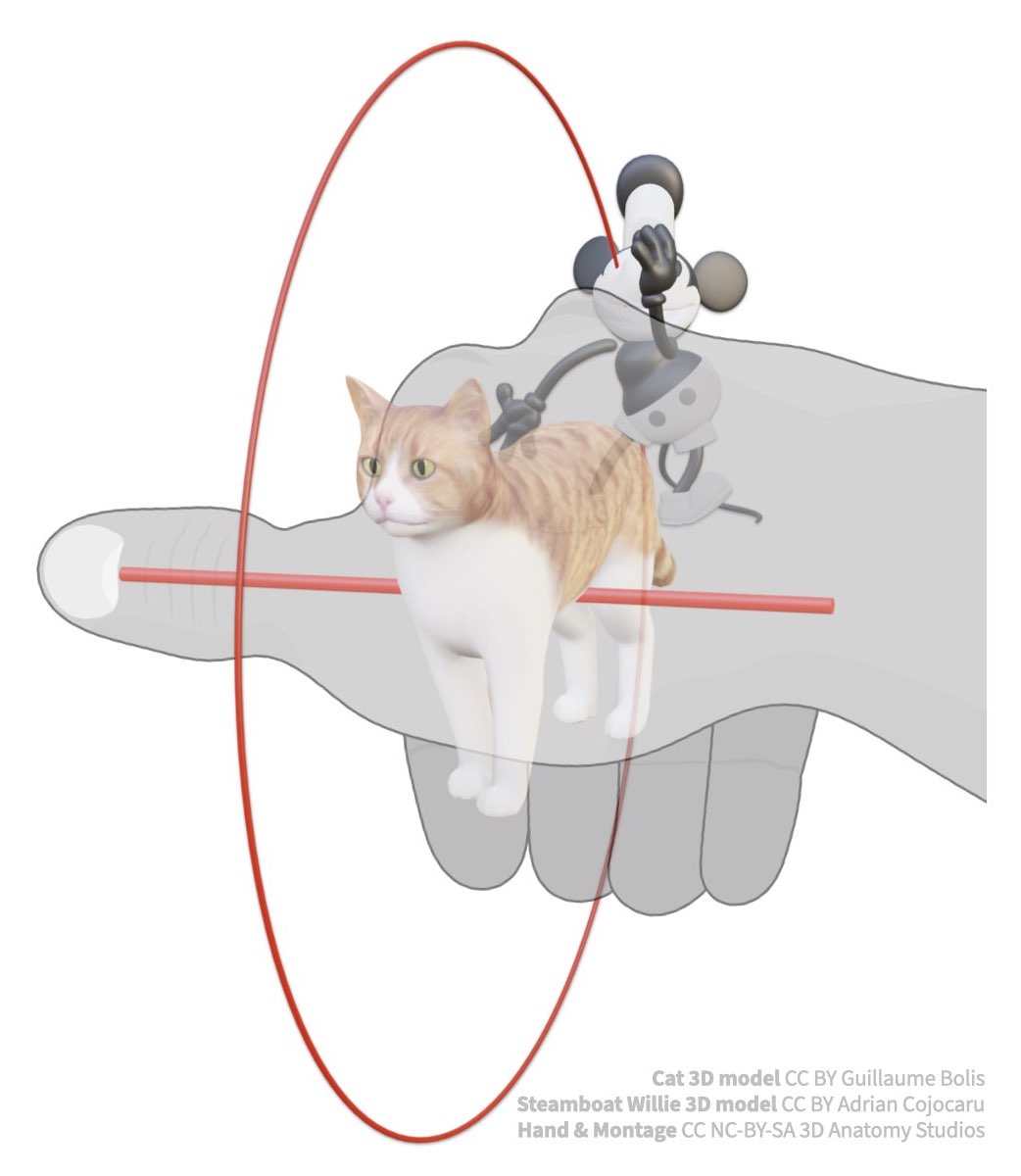
Using your hand to find the mouse's axis of rotation (straight line) relative to the cat.
Identifying the axis of rotation for circular or spinning motions is powerful because once you know the position and orientation of the axis of rotation, you know everything you need to know about the rotational movement.
How to describe 3D rotations in 2D
If two 3D objects are rotating relative to one another in 3D, it's challenging to describe that motion in a 2D form. One way is to project the 3D axis of rotation as a 2D line on images of the object from multiple views. For example, the figure below shows the motion of the mouse around the stationary cat in 2D.
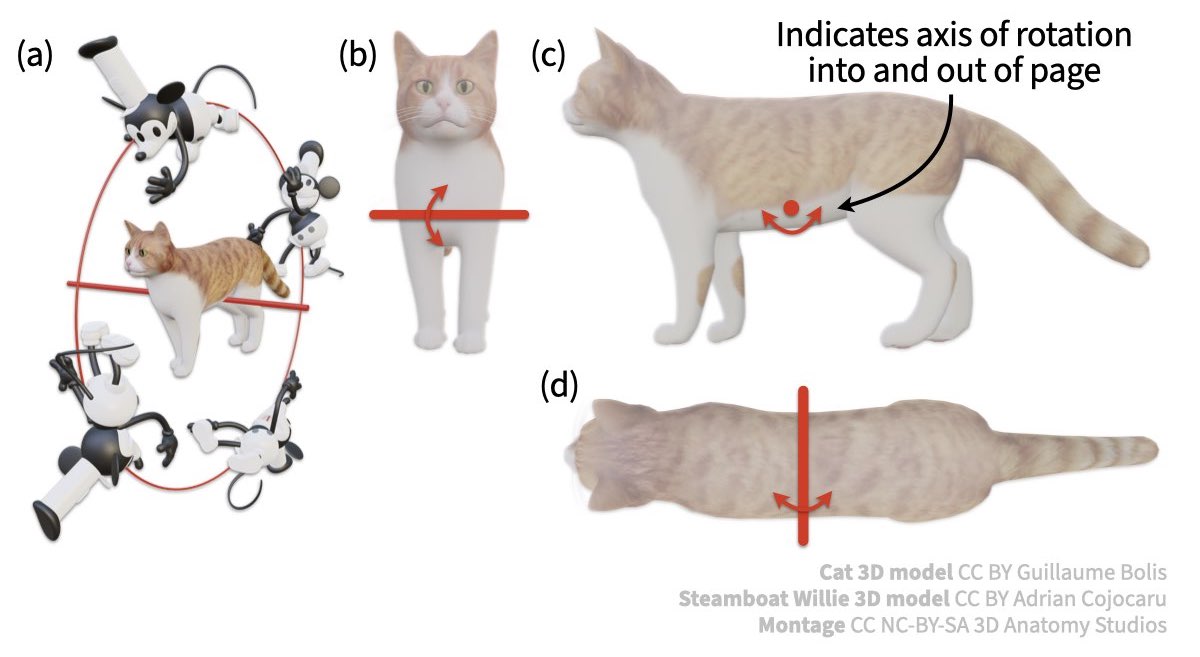
The 3D rotation of one object relative to another (a) can be represented in 2D by projecting the axis onto images of the stationary object from multiple perspectives (b-d). If the axis is oriented directly into and out of the page, it can be represented by a dot (c).
In the example above, the mouse is rotating around the cat about an axis of rotation aligned with the cat's body axes (a.k.a. anatomical axes). But in anatomy, axes of rotation may not necessarily be aligned with the major body axes. For example, below the mouse is rotating about an axis of rotation that is not aligned with any of the cat's body axes.
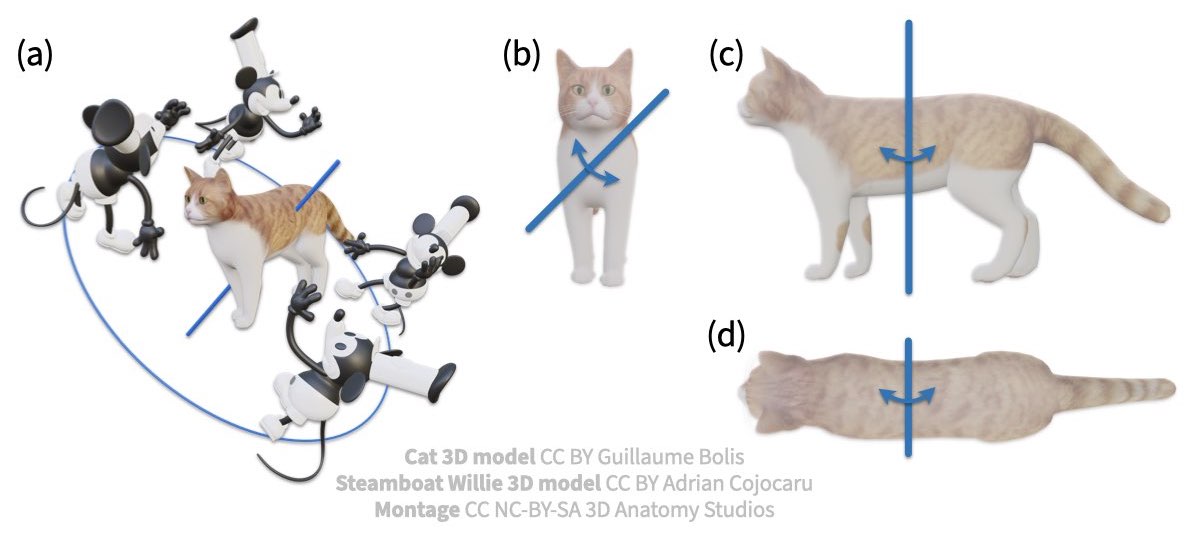
Example of mouse rotating relative to a cat about an axis of rotation not aligned with any body axis.
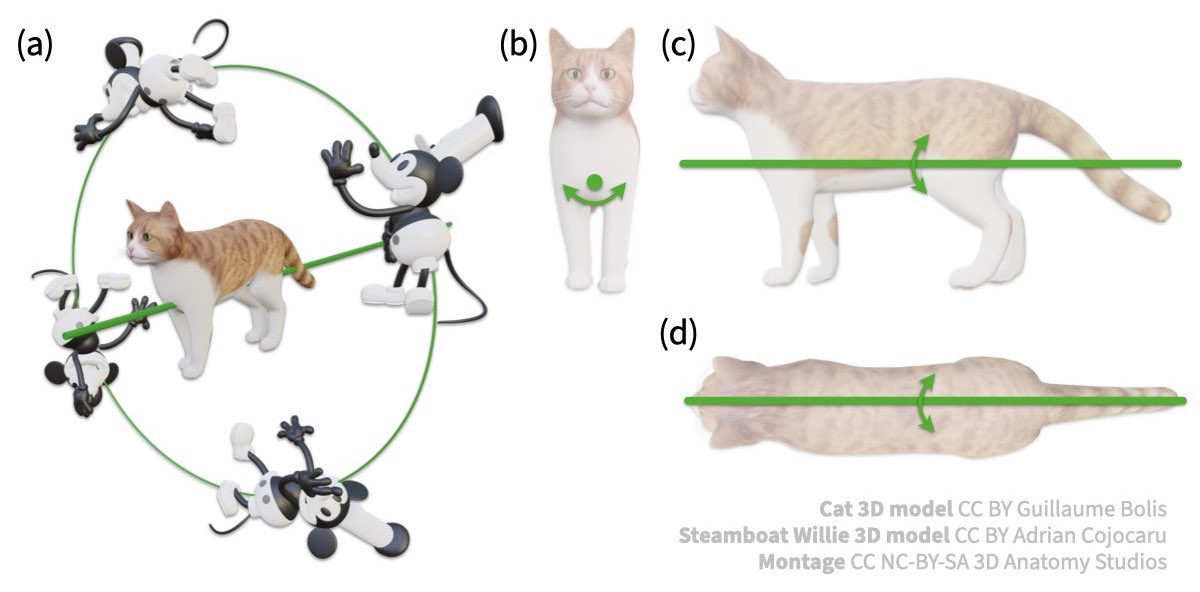
To test your understanding, draw the axis of rotation for the mouse's motion path shown below on page 1 of your worksheet. Once you've finished, check your work below.

Draw this axis of rotation in 2D on your worksheet.
ASSESS
The axis of rotation you drew in for (a) should look like the axes shown in (b-d) of the figure below.
What is an axis of translation (translational motion axis)?
Just as there are axes for rotation, there are also axes for translation (moving from one place to another without any rotational component). Using again our cat and mouse, see how the mouse is moving relative to the cat in the image below.

A mouse translating along a path in front of a cat with the mouse's axis of translation indicated by the red arrow.
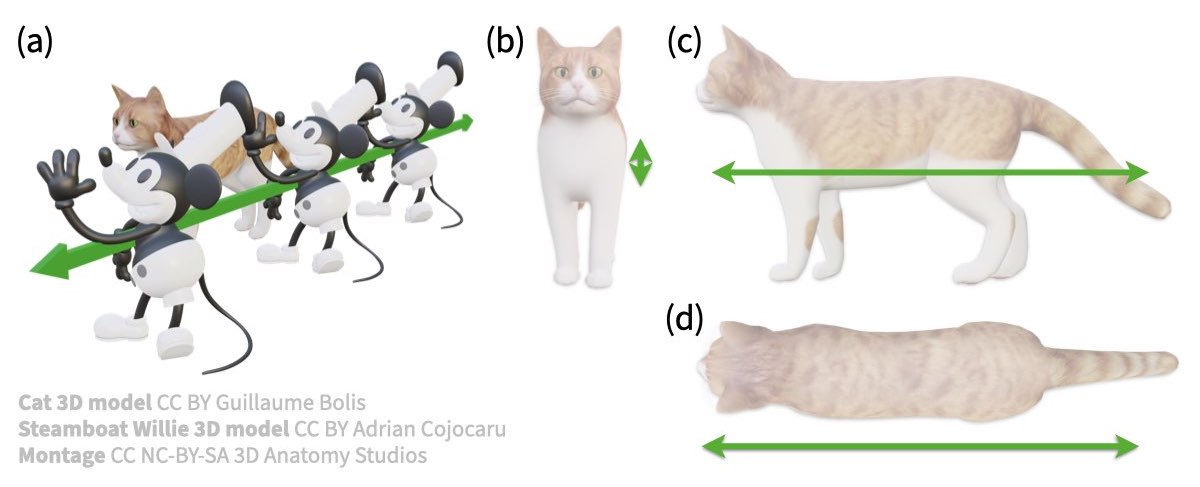
The mouse is no longer rotating but simply translating; another way to think of this is moving while facing the same direction the whole time. The mouse's axis of translation is a vector parallel to (aligned with) the mouse's direction of movement. And just as for rotational axes, 3D translational axes can be represented in 2D by projecting the axis onto multiple views.
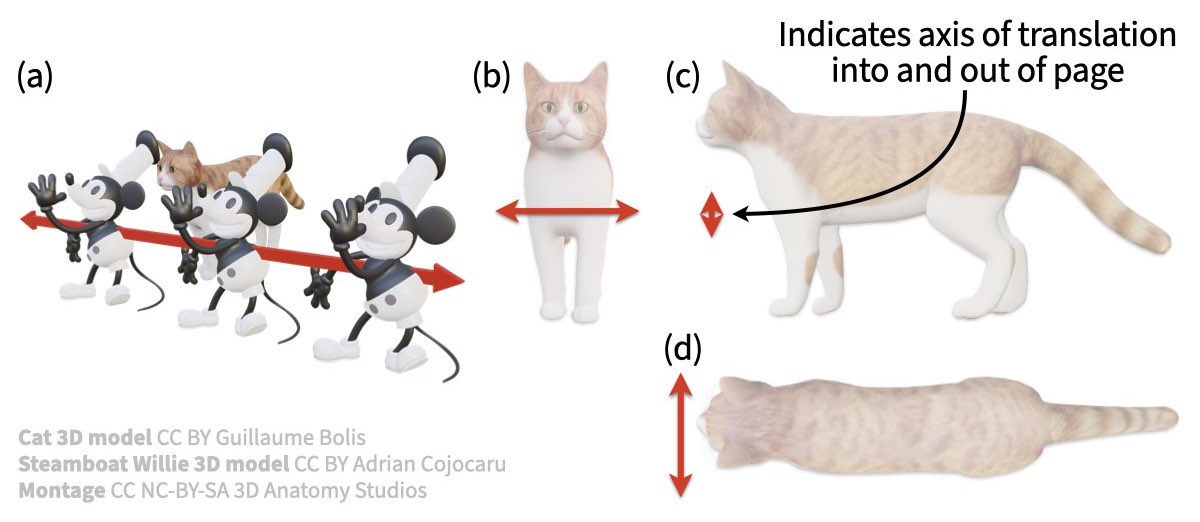
The 3D translation of one object relative to another (a) can be represented in 2D by projecting the axis onto images of the stationary object from multiple perspectives (b-d). If the axis is oriented directly into and out of the page, it can be represented by a line with the two arrowheads touching (c).
Unlike an axis of rotation, the position of an axis of translation doesn't really matter that much. You can position the translation axis to line up with any part of the moving object (e.g., the mouse's head, hand, torso, etc.) since any point on the object are moving in the same way. What matters is the orientation of the translation axis.
And as for the axes of rotation, the axis of translation doesn't necessarily have to be aligned with any body axes. The example below shows the mouse moving along an axis of translation not aligned with a body axis.
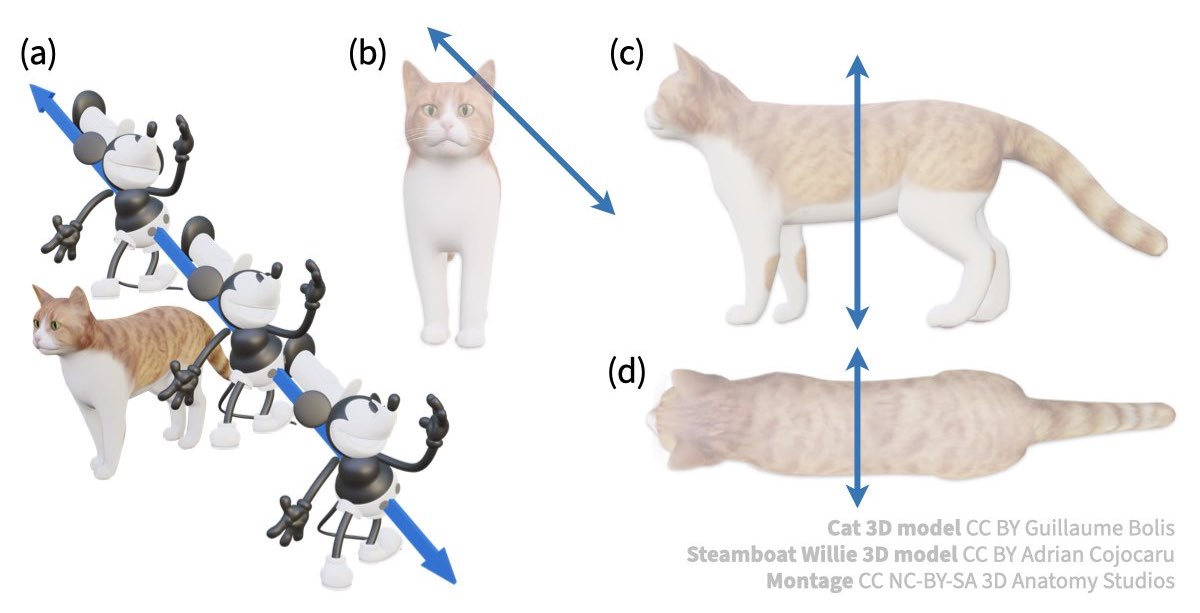
Example of mouse translating relative to a cat about an axis of translation not aligned with any body axis.
To test your understanding, draw the axis of translation for the mouse's motion path shown below on page 1 of your worksheet. Once you've finished, check your work below.

ASSESS
The axis of translation you drew in for (a) should look like the axes shown in (b-d) of the figure below.
Summing it all up
To sum up, here are the major points regarding motion axes:
- Motion axes can describe the motion of any object relative to another object
- Axes of rotation describe motion along a circular path; axes of translation describe motion without any rotation
- To identify an axis of rotation, follow the motion with your fingers and your thumb will indicate the axis
- For axes of rotation the position and orientation matter; for axes of translation only the orientation matters
- Axes of rotation and translation may not necessarily align with the major body axes of either object
- Motion axes can be depicted in 2D by projecting the axis onto multiple views
No comments to display
No comments to display